Sorting the RSS and Atom feeds I follow
YouTube's recommendations distract me. That's why I've used uBlock Origin to hide all links to YouTube's Home page and all the recommendations that show in the sidebar and at the end of videos, and I interact with the Subscriptions and Search pages instead. However, even those two pages have become worse, with large video thumbnails, forced Shorts display, and irrelevant search results, all of which make it hard to find the videos I care about, and distract me with videos I don't care about.
So today, I've decided it's about time I stop checking sites that distract me for updates.
Instead, I took Timo Tijhof's advice, and moved all my YouTube subscriptions to my RSS reader (which is currently Thunderbird).
In turn, that meant I had to change how I organize all RSS feeds, as the newly-added channels no longer fit within my framework.
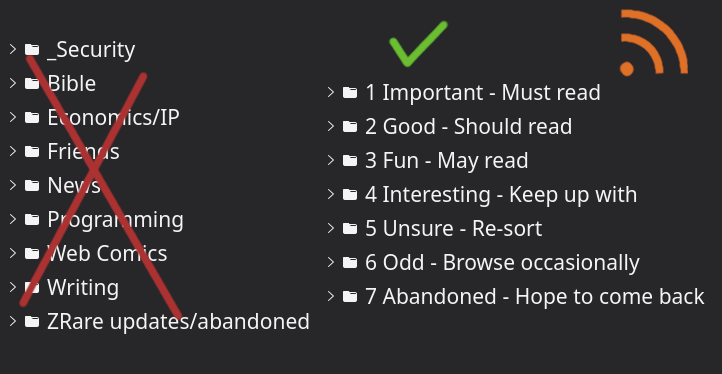
The problem
Taking stock of the problem, I had about 120 feeds I subscribe to. Those were categorized into topics I care about— friends, programming, writing, news, economics, and so on. However, within each category, I didn't check all of the feeds; I would check a few, while leaving others unread. I never caught up with feeds that updated often, as large numbers of unread posts were daunting to deal with. In turn, this meant that I missed updates from friends who posted multiple things in a row, and failed to keep up with posts from organizations I care about.
The solution
For inspiration on how to organize things, I looked at Joel's article, "Trying to organize my feeds" and Ruben's article, "Organising my feeds using Permaculture principles".
Both of them say that some people they follow post more frequently, which makes it hard to keep up with those who post less often.
The solution to that, both in their case and in mine, is prioritization.
I can't read every single post from all 120 blogs I follow. However, if I split those blogs into important and unimportant ones, I can read the important half on busy days, and quickly sort through the rest in my free time. And by adding my YouTube subscription into the same system as blogs, I can make sure I don't accidentally watch unimportant videos while failing to read important articles (in a "priority inversion").
Joel prioritizes his feeds by splitting them into Friends, Sporadic high-quality blogs, and members of various communities (including 100DaysToOffload!).
Meanwhile, Ruben prioritizes by splitting feeds into close friends, favorite blogs, then less favorite blogs, depending on how often he visits them. He names all those groups after parts of a garden (starting from a porch and moving to a swamp) to draw a parallel to permaculture and simplify sorting decisions.
My implementation
Ruben's advice resonated better with me. I tailored his idea so that the categories are named after the action I should take when read them. I would like to call this "by criticality", as it groups feeds in terms of how critical reading them is for me.
The categories I use are:
- Important - Must read. These are a few key blogs from which I do not want to miss an update, plus the the Debian and Arch Linux security lists to keep up with security updates.
- Good - Should read. These feeds are high-quality—things like The Autodidacts. I can miss them for a while, but it's worth reading every single post, so I will take the pain to do so.
- Fun - May read. These posts are good but not as productive. Mainly includes webcomics—like Darths&Droids—and entertainment—like rekrap2's YouTube channel—, but also includes a few programming blogs as well as the Hacker News Front Page. I could get away with skipping content here, but I enjoy interacting with
- Interesting - Keep up with. I like the posts in these feeds, but I can never get around to them in time—like with AI as Normal Technology. Still, I would like to keep up with them, so I will be looking at every single title at the very least.
- Unsure - Re-sort. A few feeds I've added recently and still don't know the place of—say, scuti's text garden. If I've read this far, I should likely move these up; if I can't get to them, I might be better off moving them down.
- Odd - Browse occasionally. Feeds I don't want to go through the entirety of. They post things I don't find as relevant, yet I want to keep them around for the occasional gem—for example, this is where I keep the CoRecursive podcast. I will check some of the article titles, but I won't be afraid to "mark all as read" if the numbers grow too large.
- Abandoned - Hope to come back. Feeds that were active once, but have gone for a while without new post—say, TeddyDD's blog. Rather than have them take space with more-important feeds, I would rather keep them separate until they start posting again.
It is easier to sort feeds into Ruben's categories than into mine. However, my categories should make it easier to decide what to do with incoming posts. As I read posts more often than I add feeds, I like that economy.. for now.
Yet, the real test will come once I find more blogs to follow and the list grows from 120 feeds to 240 feeds (like Joel's) or even 360 feeds (if I want to feel overwhelmed 😛). Let's see how my system fares then!
I will keep this post updated with any changes to my category list!
This has been my 29-th article for #100DaysToOffload. Shorter than my usual 2K pieces, but not as short as my earlier reply blog!
Browse more articles?
← You can now browse my site by tags! Articles tagged website (6/7) I made an ideas page! →
← Simple CI/CD with bare git repositories Articles tagged 100DaysToOffload (29/40) Memories of October: a collage of blogs →
← Simple CI/CD with bare git repositories Articles on this blog (36/49) Memories of October: a collage of blogs →