"BugsDone": Days 1-2

July 6th through 13th was an incredibly busy week for me. The occasion? My BugsDoneQuick event was going on, and every day I was streaming for about 6 hours, from 8 UTC through 14 UTC, fixing issues and bugs on random free/open-source projects. At the rate of one bugfix every ~two hours, that is a lot of bugfixes—in codebases I knew next to nothing about!
You can already watch all the recordings from the BugsDoneQuick streams, but since they are rather lengthy, here is a recap for those of you who prefer reading and eschew watching long-form content 😁
- Part 1: covers days 1 and 2; with JavaScript and more JavaScript; this is the article you are currently reading.
- Part 2: covers days 3 and 4; with Python and some more KDE.
- Part 3: will cover days 5, 6, and 7, and focus on LibreOffice—stay tuned!
- Part 4: will summarize everything and cover day 8—stay tuned!
Day 1: Element
A perennial problem for the BugsDoneQuick event was that I lacked recommendations for project to work on—and I really wanted to be working on things that actual people use and have encountered issues with.
But for the first day, I actually had a recommended project! A relative's company had, in the recent shutdown of Skype, switched over to Element with a self-hosted Matrix instance. And when I went around asking for issues in open-source applications, it turned out they had a lot of misgivings over the "call sidebar" of Element. (The main one being that it popped up every time when you start screen-sharing—something I later opened an issue about.)
Issue 1: Call sidebar forgetting it was closed
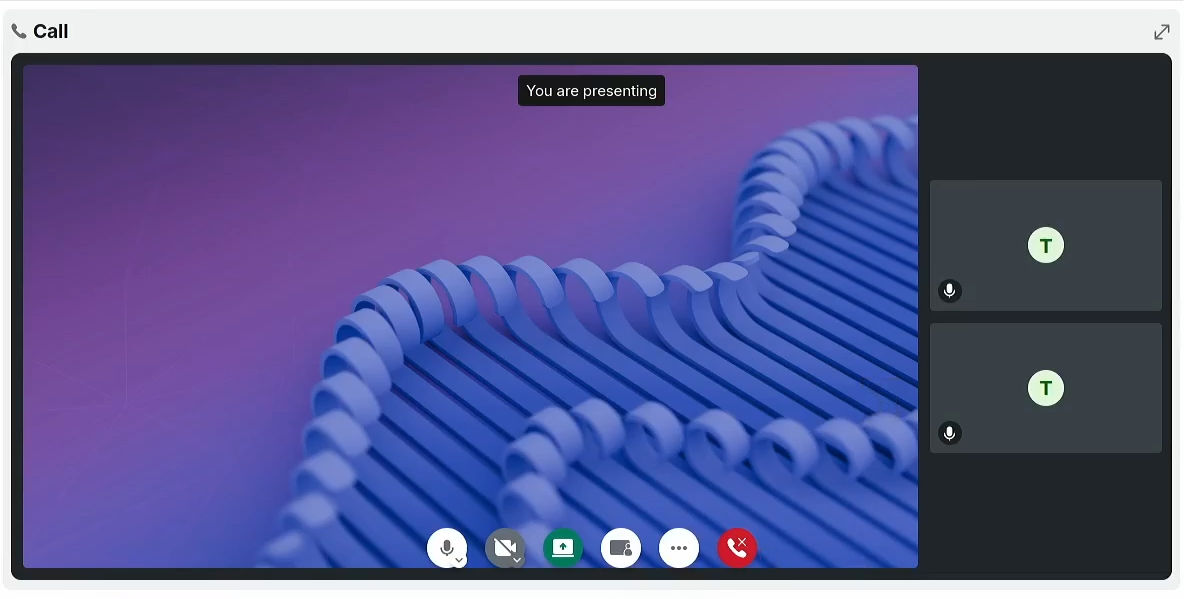
So, while preparing for the stream the night before, I made sure to pick out an issue about the call sidebar from the Element GitHub repository. Apparently, the sidebar keeps popping up every time you reopen the call interface after navigating around, which is probably behind the perception of said relative that "the sidebar cannot be closed".
Jumping into Element's React codebase for the first time, I was quite surprised by the lack of redux or any redux-like mechanisms for storing state. Instead, while looking around the "Legacy Call View", as the 1-on-1 call interface is called, I found a few singletons which stored state in a global mapping and communicated changes to that state via EventEmitter events. I picked the one called LegacyCallHandler to store sidebar state, and the rest of the 1 hour and 38 minutes it took me to complete the issue were mostly spent weaving the state back and fourth through all of the code already gluing LegacyCallView and LegacyCallHandler together.
Something of note was the Picture-in-Picture view which shows while you are in a call but not looking at the specific chat room. I missed it on my first pass with the sidebar, but after a break, I looked at it for another 22 minutes, and ended up removing the Show/Hide sidebar button, since it never shows up in the Picture-in-Picture preview.
Issue 2: Search results breaking links
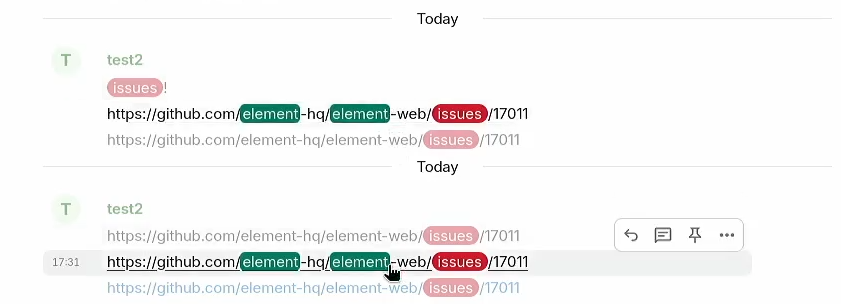
The second issue for day one was one about highlighting in search results breaking links, also occurring for keyword notifications. I picked that pair of issues because they were tagged as "Help Wanted", so it seemed like they would be welcoming to the style of drive-by contributions I was doing on the BugsDoneQuick stream.
(Also, working on the issue reminded me of one of my Google Code-in contributions back in the day, which was related to searching by emojis in Zulip, and likewise involved correctly highlighting found the search keyword without breaking HTML tags.)
The first ~30 minutes went into finding where highlighting and parsing of link happens, starting from the search box and going down the code. I finally located the link parsing as being done by the so-called Linkify function/component right before displaying the message on the screen, and the highlighting as being done by the HtmlHighlighter in an unassuming function called analyzeEvent, indirectly called by the components responsible for displaying messages on-screen.
I then investigated whether Linkify could be changed to understand links broken up by tags, but it seemed like a lot more work that fixing the order of things, since the highlighting of keywords was happening before linkify could transform the textual links containing those keywords into real links—and thus the highlights were tripping up the linkifier.
So, the fix was to move things around so that Linkify gets processed first, before doing highlighting, so that highlights can operate on link texts, without randomly breaking them. Luckily, the HtmlHighlighter was already HTML-aware, so it wouldn't break the link tag itself by highlighting its href= attribute. I did also sit down to write tests for the highlighting of messages with links, for a total time of about 2 hours to fix the issue.
That roughly concluded the first day. It was a Sunday, and my morning was busy with churchgoing activities, so I couldn't dedicate the whole 6 hours as during the workweek that followed. I spent the rest of the evening excited about the whole event, planning for the next project, babysitting the recording transcription process (another thing that would become a theme), and overall optimistic that if the first day went that smoothly, the rest of the week was surely going to be awesome.
A lesson I got out of the Day 1 work was that I should always (always) check the contribution guidelines before starting work on a project. In this case, Element had a CLA—and as explored by e.g. Drew DeVault, CLAs are bad because they let a company have monopoly over the commercial exploitation of a project. I figured my two drive-by fixes were tiny enough that I could accept a licensing agreement, especially since the licensing agreement specifically said that Element would be taking over the responsibility for problems that come from my bugfixes. Yet a CLA like that could easily drive me away from voluntarily submitting a more substantial contribution, such as an implementation of a missing feature.
Monday, Day 2: PeerTube
Running low on project suggestions, I knew that if I'm to have a different project for each day of the event, I would have to pick some of the projects myself. With that in mind, for day 2 of the event, I chose PeerTube: the platform I used for streaming all the live videos. After some earlier mishaps, I ended up self-hosting my own PeerTube instance for the event, so I even had experience with most parts of it, from administration to streaming and uploading videos! (Hey look- dogfooding!)
Issue 3: Preserving scroll positions when navigating
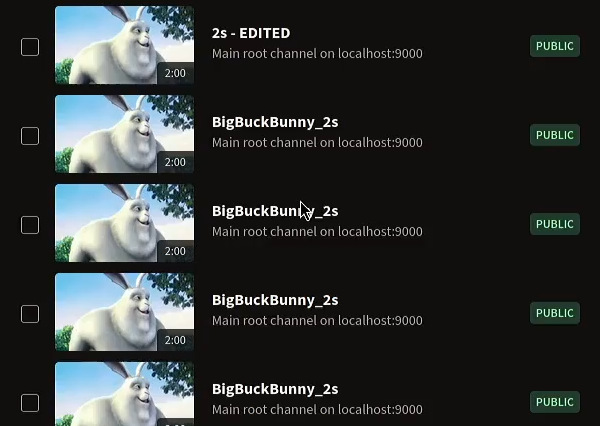
The first issue for day 2 was about preserving scroll position when navigating back on a few pages in the "Library" part of PeerTube. I spent an inordinate amount of time reproducing the issue, since losing the scroll position was happening only occasionally in my testing, and sometimes it did keep it. I tried a lot of very specific sequences of steps that would lose the scroll position a few times in a row, then suddenly would work out just fine when I retested things later.
It turned out that the issue happens because the page occasionally doesn't load fast enough, so the the position we try to scroll back to is past the lower end of the page. As I was testing on localhost, my failure to reproduce the issue stemmed from the fact that loading the page from the local machine was just quick enough that sometimes the page loaded before the navigation attempted to restore scroll position. When I turned on network connection throttling in Firefox's development tools, I was finally able to reproduce the issue consistently. 🎉
I initially investigated ways of ensuring that the whole page is loaded before restoring scroll—perhaps by enabling some feature of the router responsible for preserving scroll positions. Unfortunately, this investigation immediately ended up in a 6-year-old issue for the Angular Router, with workarounds that generally involved waiting for a set amount of time, rather than waiting on some "loaded" event from the page we are navigating to.
PeerTube already implemented its own ScrollService to fix some of Angular's Router's behavior, so I considered getting a loaded event of sorts from the page to the service. However, on second thought, I realized I don't care if the page is fully loaded—I only care whether I can scroll to the remembered position. And with that in mind, I implemented everything with a ResizeObserver, which monitors the page's height and re-tries scrolling if it can finally scroll to the position remembered from navigation.
The final time for this bug was 2 hours and 23 minutes. A lot of those ended up spent trying to fit the events from ResizeObserver and navigation into a nice rx.js pipeline that takes care of everything, but I didn't find a way to model the "unhandled scroll event" state nicely, so I submitted a version working with variables instead. It got merged two days later with no comments. 😅
Issue 4: Scheduled lives feature
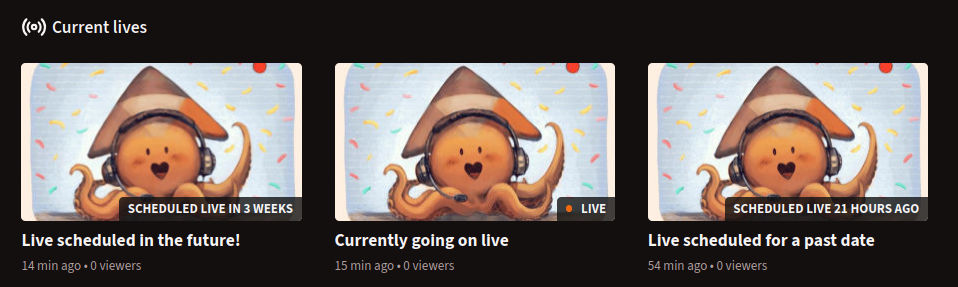
For my next issue, I took on a feature request that I also wanted myself—that of implementing scheduled live videos. In current PeerTube, you can only see livestreams that currently happening; however, I would really like streams like mine, that are scheduled for a specific time, to be discoverable even before they start.
I decided to go slim on fixing the issue on the livestream (figuring out that since it is a feature request and not a bug, it would take longer to solve—plus I was already rather tired from the first issue). I had already noticed that videos have a field called "originally published at", used for storing information about the video's original publication irrespective of the actual date it was uploaded at—and figured I could reuse that field to store the original date the stream is scheduled for.
Yet, even if I had a place to store the scheduled date in, I still needed to implement everything else. In order, I first worked on the backend, where a VideosIdListQueryBuilder was responsible for filtering videos and needed to be modified so that it would return live videos that are not currently live as long as they are scheduled. Then, I moved to the API, where the video-api-format file was responsible for exposing only the needed details of videos to clients, since it had to mark scheduled livestreams in a way that the client can recognize the fact that they are not currently live.
At that moment, I became aware of the existing Scheduled privacy feature in PeerTube, which can automatically change a video from Private to Public at a specific date. There was even an existing pull request implementing a UI for scheduled videos, tho it seemed stuck in review limbo. However, upon review, I figured that the scheduled video feature, due to the way unpublished videos are kept private, wouldn't really work for scheduled streams that are public before, while, and even after airing.
As such, I disregarded the existing feature as something for a different usecase (automatically publishing a video at a given date, rather than announcing that it's going to be published at said date), and pushed on with implementing the user interface for the Scheduled feature.
Finally, I rounded things off by (completely) hiding scheduled livestreams from the main page, as they would otherwise push out actual content like current livestreams and uploaded videos, and then focused on implementing tests (and then fixing those tests), for a total time of 3 hours for the whole feature. A curious mishap with the tests was that I had a bug in the test-as-written, that sent me off on a wild goose chase trying to figure out what's wrong with federating pending live videos, only to discover the problem was in the way my test was referencing the channel the video is part of.
On a later stream, I ended up reworking parts of the code after the PeerTube maintainers requested that I add a separate field for the scheduled date instead of reusing the originallyPublishedAt field.
Conclusion
On both of the first two days, I was dealing with JavaScript-based projects. Familiarity with the JavaScript ecosystem helped while working on Element—I was able to quickly find my way around React. Plus, I didn't have to change anything on the server. Meanwhile, when I got around to working on PeerTube, I was surprised at how much Angular had changed since the Angular 1 days. I still recognized most of the concepts, so I did manage to monkey my way around to bugfixes and feature implementations, but the lack of experience did show up in longer bugfix times.
In terms of energy, I was hyped! I was doing something I have been only dreaming about for at least an year! And apparently, some of the early feedback indicated I wasn't completely boring on-stream! 😅
My first 6-hour stream working on PeerTube was a bit exhausting however; and by the end of the stream, I was already spluttering my words. That evening, I took a nice long walk around town, to relax a bit for the next day.
And, in terms of viewership, the first day naturally attracted plenty of viewers, especially friends who had heard about what I was doing. (In fact, a friend had promoted the event to a local group of developers, which is something I'm very thankful for, given my lapse in the matter 💚) So, I had a few people around, which is exactly what I wanted: a small-scale stream, while I perfect my streaming skills and presentation.
This is my 19th post of #100DaysToOffload. Last few weeks, I've gathered up content for at least 6 long-form posts, but let's see if that's enough to offset the fact that I didn't post as much during those weeks 😂
Browse more articles?
← Rest Articles tagged BugsDoneQuick (4/5) BugsDoneQuick: Days 3-4 →
← Announcing: BugsDoneQuick, July 6-13 - I need bugs, stat! Articles tagged technology (11/16) You can now browse my site by tags! →
← Rest Articles tagged 100DaysToOffload (19/40) You can now browse my site by tags! →
← Rest Articles on this blog (26/47) You can now browse my site by tags! →
Comments?
If you were around for first few days, thank you for your support. ✨
And if you are just reading this article—thank you still! Attentive audiences are hard to come by these days!
Please don't hesitate to contact me if the whole BugsDoneQuick event seems interesting to you: I love getting emails! (Even the spam ones, but don't tell them I said that 😂)